
Estepona · Málaga
Book your berth at Puerto Deportivo de Estepona
Demonstration: check availability for your dates and your vessel’s dimensions.
Start your booking
Dates and dimensions. From those we work out the berth category that fits your vessel.
Before you arrive
What you need at hand on approach.
Approach To be confirmed
With your booking confirmation
Entry heading, buoyage and depth come from the harbour office. We do not publish unverified navigational data.
Contact details — awaiting confirmation from the marina.
Marina layout
Berthing areas by size. The interactive plan with live availability opens once you pick your dates and dimensions.
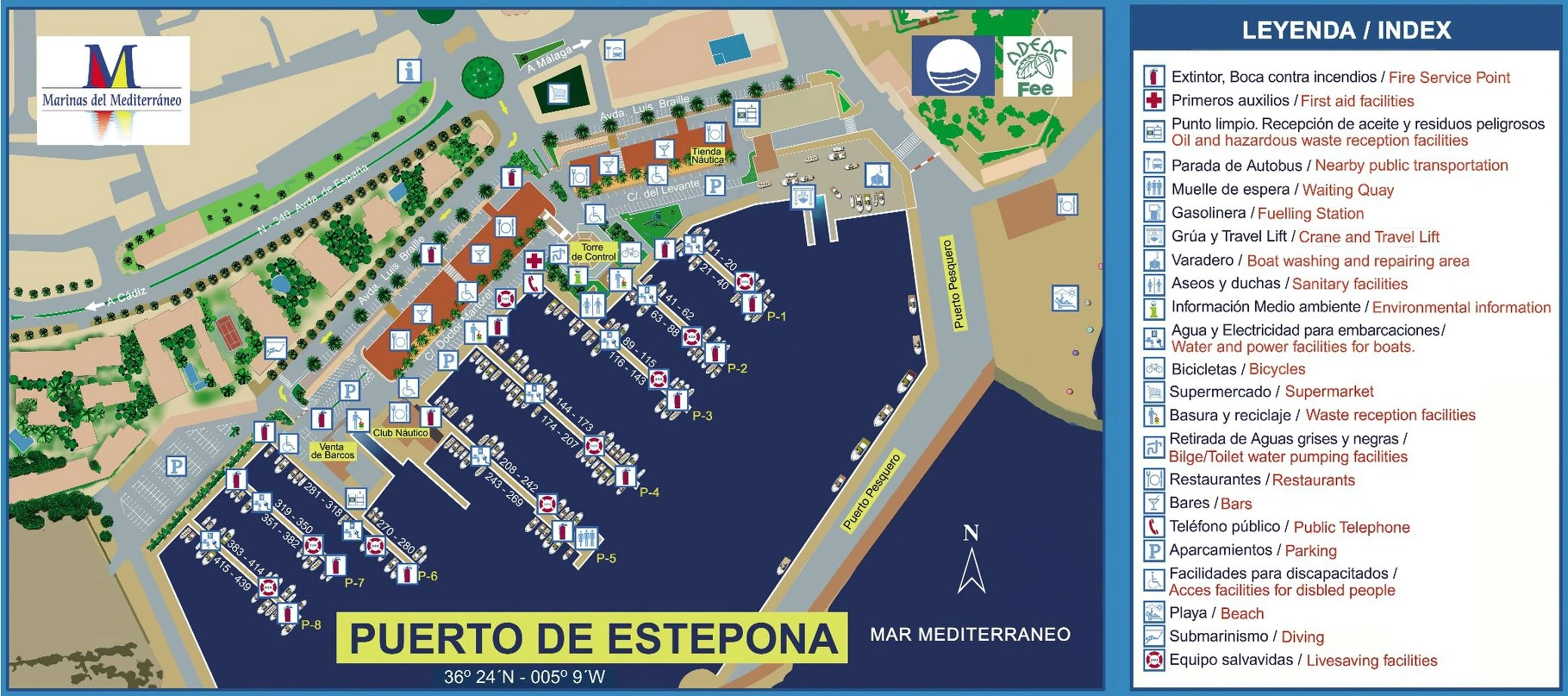
Layout description
- Above, the official plan published by Marinas del Mediterráneo. The interactive booking plan is a schematic drawing with the same pontoons P-1 to P-8 and the same berth numbers, aligned with the pontoons (the arrow shows north).
- Sizes, depths, categories and prices: sample data.
Already have a booking?
Check your stay, payment status and assigned berth with your booking reference.